
If you’re a mom of tweens and teens in competitive dance, lacrosse, or both, you already know this truth:
Your life does not come with neat blocks of free time.
It comes in car lines, studio hallways, sidelines and hotel rooms. Right between emails and snack runs. And yet, this is exactly where so many women are quietly building brands, blogs, businesses and creative careers.
Welcome to the Carpool CEO era. This post (not sponsored by, but featuring, my ride or die Hyundai Palisade) is for the moms who don’t work 9–5. We work in the in‑between.
The myth of “when things slow down”
In a previous life, I used to believe I would build my next chapter when life calmed down. When the schedules got lighter. When the practices eased up. When the competitions ended.
But anyone raising driven kids knows this: Life doesn’t slow down. It simply shifts. So instead of waiting for space… I built systems that fit inside the life I already had.
How the Carpool CEO actually works
The real shift for me wasn’t working more. It was working smaller.
Smaller pockets of time.
Smaller windows of focus.
Smaller, repeatable systems.
Here’s what changed everything:
- One place to keep every idea
- One simple content workflow
- One design system
- One scheduling system
Not a dozen apps. Not complicated processes. Just tools that remove friction.



The Carpool CEO Productivity Toolkit
Here is a checklist you can use to to create, organize and publish content, even during peak sports season.
This is designed to work whether you’re:
- building a blog
- growing a creator brand
- juggling client work
- or rebuilding your career in a new season
Use it as your weekly setup and your travel‑day survival kit.
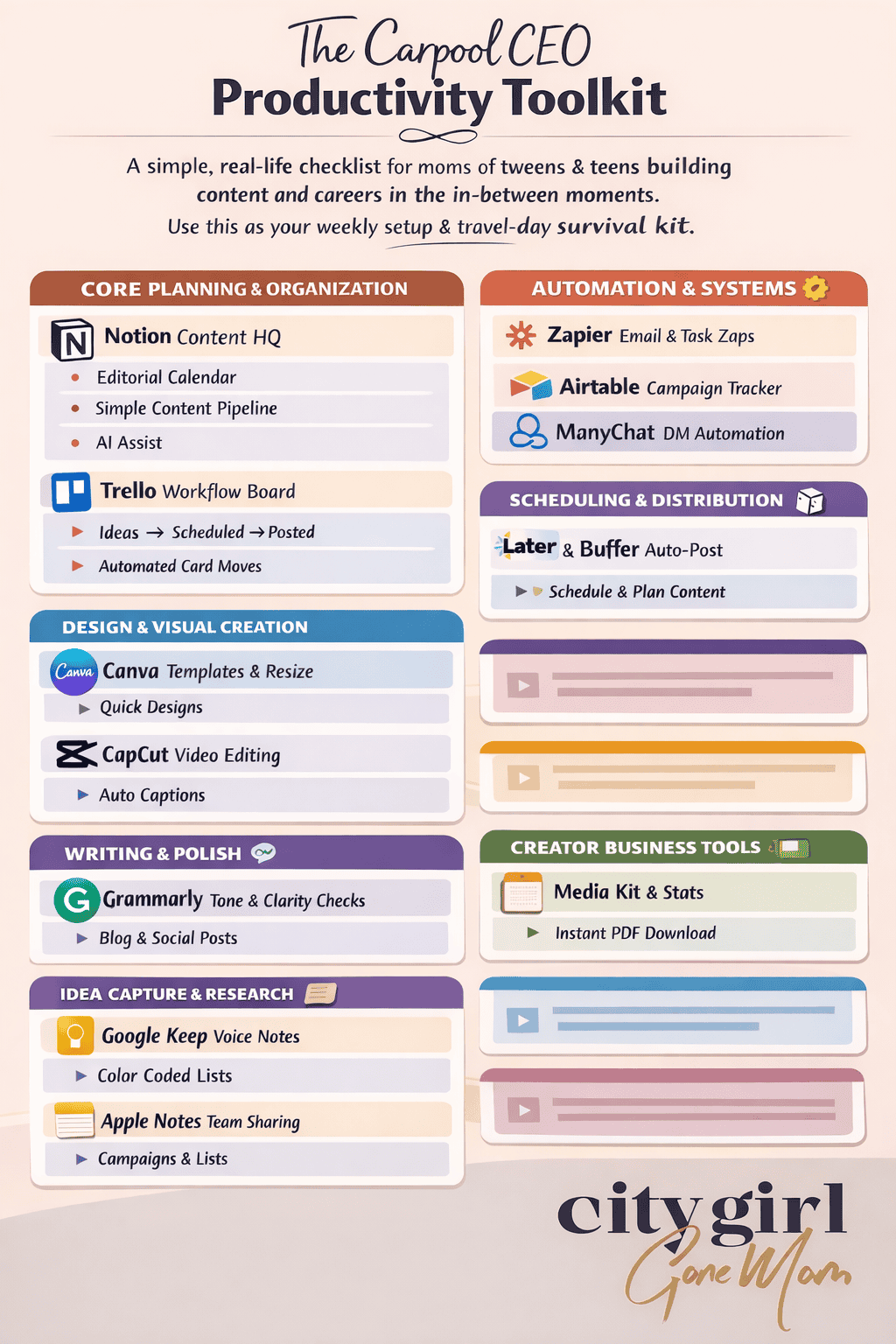
The Carpool CEO Productivity Toolkit
A simple, real-life checklist for moms of tweens & teens building content and careers in the in‑between moments.
Use this as your weekly setup and your travel-day survival kit.
CORE PLANNING & ORGANIZATION
Notion – Your Content Headquarters
- Store all blog ideas, post drafts, brand notes, and links
- Editorial calendar view
- Simple content pipeline (Idea → Draft → Scheduled → Live)
- AI assist for outlines and repurposing
Trello – Visual Workflow Board
- One board for all content
- Lists: Ideas / In Progress / Waiting / Scheduled / Posted
- Due dates on every card
- Butler automation for moving cards automatically
Google Workspace (Docs, Sheets, Calendar)
- Blog drafts in Docs
- Campaign & link tracking in Sheets
- Content blocks on your Calendar
DESIGN & VISUAL CREATION
Canva – Everyday Design Tool
- Brand Kit loaded
- Reusable templates for blog headers, pins, and social
- Resize designs for every platform
- Magic Design and background tools for fast graphics
CapCut – Fast Video Editing
- Auto captions on
- Reusable Reel / TikTok template
- Saved brand fonts and colors
WRITING & POLISH
- Tone check for blog posts
- Caption clarity for social
- Brand emails and pitches
IDEA CAPTURE & RESEARCH
- Quick voice notes and idea dumps
- Color‑coded lists for blog, social, and collabs
- Shared notes with my team featuring campaigns, lists, screenshots, and more
- Folders for each content pillar
AUTOMATION & SYSTEMS
- Save email attachments automatically
- Send new content ideas into Notion or Sheets
- Auto‑create tasks from form entries
Airtable (optional for advanced creators)
- Track campaigns, deliverables, payments, and links
- Filter by brand, month, or platform
ManyChat – DM Automation for Instagram & Facebook
- Automatically send links, downloads and replies when someone comments a keyword or sends a DM
- Deliver your checklist, freebies, blog links or opt‑ins instantly (no manual messaging)
- Tag and segment followers based on what they ask for
- Connects to email and CRM tools so leads go straight into your system
Benefits for busy mom creators:
- You never miss a lead while you’re at practice, carpool, or traveling
- Your audience gets what they asked for immediately
- You grow your email and follower base, and nurture followers without extra work
SCHEDULING & DISTRIBUTION
- Schedule posts while traveling or at practice
- Visual grid planning
- Caption drafts stored with posts
CREATOR BUSINESS TOOLS
Creators Jet – Media Kit Builder (digital one‑pager)
- Auto‑updated stats
- Brand-friendly layout
- Downloadable PDF link
ShopMy – Affiliate Storefront & Link Management
- Create a clean, curated storefront for all your fashion, beauty and lifestyle links
- Organize products by category, trip, outfit, or blog post
- Generate commission-ready links in one place (no jumping between networks)
- Easy to share collections for blog posts, IG stories, and ManyChat delivery
Benefits for busy mom creators:
- Your audience finds everything you recommend without hunting
- You keep links organized for tournaments, trips, and weekly outfit posts
- You turn everyday recommendations into consistent, trackable income
THE CARPOOL CEO WEEKLY SETUP (10 MINUTES)
- Open your Trello content board
- Add 3 new content ideas to your Trello – Ideas list
- Assign publish or draft dates on your Trello cards
- Drop links, notes, and references into your Notion workspace
- Pre‑design one graphic or cover in Canva


THE PARKING LOT CONTENT RULE
If you can:
- outline
- caption
- plan
- design one slide or post
…you are working. It counts.
Build in the cracks. That is the Carpool CEO way.

Final note for the mom building something more
You are not behind.
You are building inside one of the busiest seasons of your life.
And that makes you resourceful, efficient and far more prepared than you realize.
You don’t need more time.
You need systems that move with you.
That is the real power of the Carpool CEO.
YOU MAY ALSO LIKE



SHOP THE LOOKS

Pin This Post
LISTEN TO THE PODCAST